Get your auto shop listed — free
Set up one complete shop page, share your booking link or QR code, and let customers choose a service and time without a long phone call.
Start with the essentials in about two minutes, then add photos, services and recommended starting prices to complete your page.
YOUR BOOKING PAGE
Take bookings without stopping work to answer every call
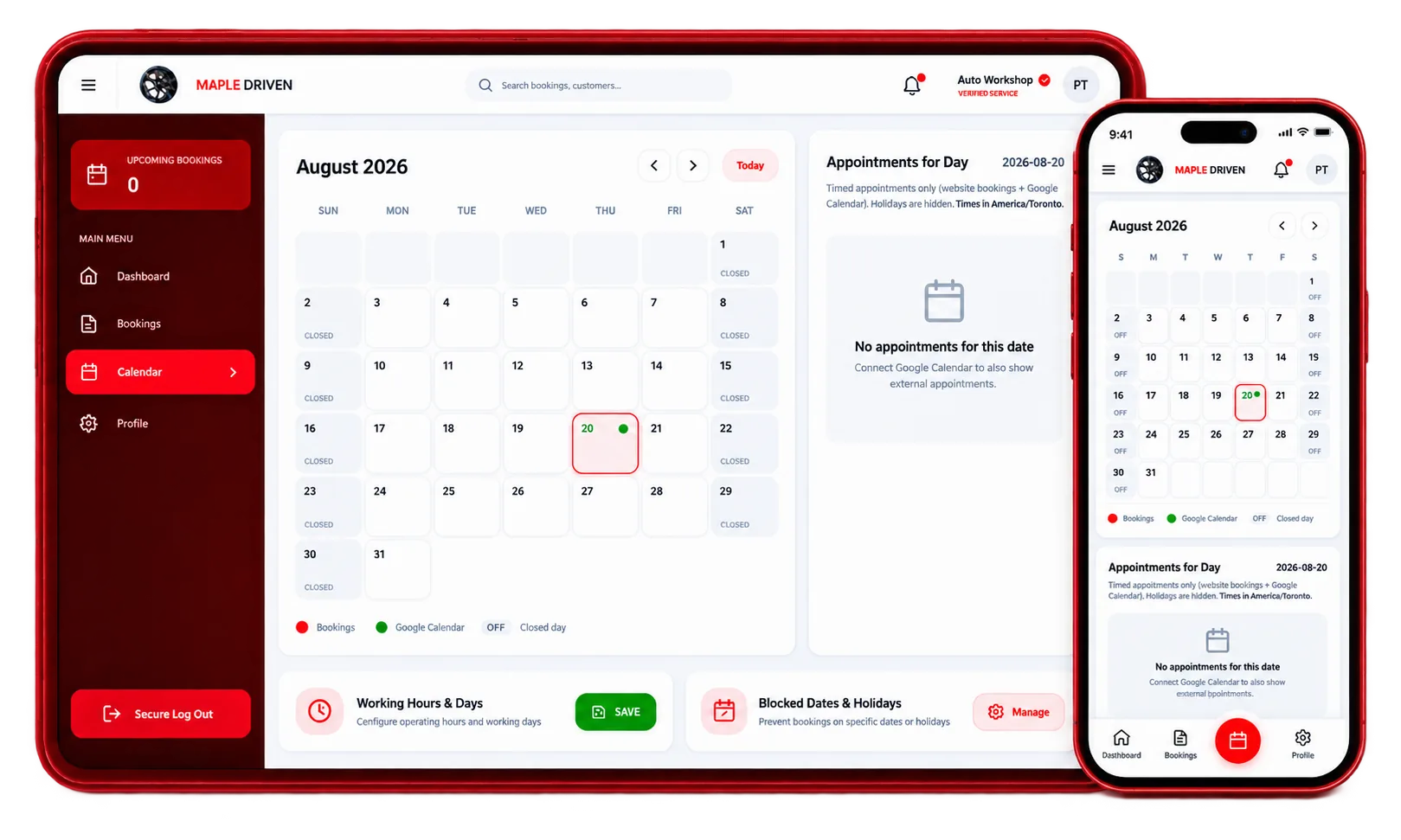
Customers choose a service, add vehicle details and pick a time online. Confirm requests with a tap, or switch on instant booking for the services you choose.
Connected calendar
Connect your calendar and your busy times are blocked automatically, so nothing is double-booked.
You control availability
Set working hours, breaks and the times you want customers to see.
Respond from any device
Review and respond to appointment requests on desktop, tablet or mobile.
AI receptionist
Every call answered. Even when you are under a car.
Your shop's own assistant picks up when you can't, answers questions about your shop, finds a free time in your calendar and books the job - then tells you exactly what happened.
Without it
- The phone rings out while you work
- Most callers never leave a voicemail
- They call the next shop instead
- You call back the next morning - too late
With it
- Every call answered in seconds
- Questions answered from your own shop details
- The job lands in your calendar
- You get a short summary of each call
Hi, are you open Saturday? My brakes are squeaking.
Yes, we're open Saturday 9 to 3. Is this for your 2019 Civic?
Yes, that one.
I have 10:30 or 1:00 free for a brake check. Which works?
10:30 please.
What you see after the call
Brake check · Sat 10:30 am · 2019 Honda Civic
Booked straight into your calendar.
Example conversation
Connect your number
We give your shop its own line. You forward missed calls - or all calls - to it once, at your phone company.
Choose when it answers
Only when you miss a call, or every call after your phone rings a few seconds. Turn it off any time.
It books into your calendar
It checks your real free times and your services, then books the job or sends you a request to confirm.
You see every call
Who called, their car, what they need and what was agreed - as a short summary and the full conversation.
Shop management
Run the whole shop from one screen
From the moment a car is booked to the moment it is picked up - on the computer at the counter or the phone in your pocket. Included with your MapleDriven shop account.
Today
+ Add a walk-inChecked in
Sam L.
2020 Honda Civic
Brake check
Inspecting
Priya S.
2019 Toyota RAV4
1 red · 2 yellow
Working
Tom B.
2023 Hyundai Sonata
1.2 of 1.5 h
Ana R.
2015 Ford F-150
Oil change
Ready
Lee K.
2018 Kia Soul
Customer texted
Example board
Today board
Every car of the day in one place: booked, checked in, inspecting, waiting for approval, working, ready, picked up. Move a car with one tap.
Job card
The car, what the customer said, the mechanics and bay, the work clock, and labour, parts and fees with tax.
Inspection with photos
An 11-point checklist - Good, Soon, Now - with quick reasons and photos for each item.
VIN look-up
Type the VIN and the year, make, model and trim fill in by themselves.
"Your car is ready" text
One tap on Ready sends the customer one short text. Never late at night.
Customers and car history
Every customer with their cars, visits, calls and job cards - only your shop sees them.
Estimates the customer approves
Send the work line by line; the customer says yes or no to each.
Invoices
GST / HST, your logo, print, PDF or email - straight from the job card.
WHAT YOU GET
One shop page for details, sharing and online appointments
Set up your profile once, then use the same link on Google, your website, social profiles and a counter QR code. Customers see your services before they contact you.
Fewer interruptions during busy hours
Customers provide the service, vehicle and preferred time online instead of starting with a long phone call.
Simple request decisions
Review the request, then accept, decline or suggest another time. Instant bookings happen only on the services where you have switched instant booking on.
A profile customers can understand
Show accurate hours, services, photos and starting prices so nearby drivers can decide whether your shop fits their needs.
Example Auto Shop
Licence checkedBMW M3 • Bay 1
Audi Q5 • Bay 2
Honda Civic • Bay 3
Example Auto Shop
Example profile
45 min • Includes inspection
Example Auto Shop
OpenShop details • distance shown
NEW CUSTOMERS, LATER
Serve regular customers—and help nearby drivers discover you
Give regular customers a faster way to return, while a complete profile can also appear to drivers searching by service, area or distance.
Appear in relevant local searches
Complete profiles can be discovered by service and area. Search visibility and rankings are never guaranteed.
Manage all appointments in one place
See requests and bookings in one place. Accept, decline or suggest another time from your phone.
Make your QR and link work for you
Put the QR code at your counter and share the same link online so customers can return whenever they are ready to book.
HOW JOINING WORKS
Live in four short steps
Ask to join, complete the essentials, share your link and choose how bookings reach you. No website work, no technical setup, and nothing to install.
Ask to join
Send your shop name, phone and email (we confirm both with a code). Our team calls you, checks the details and opens your shop sign-in.
Build your shop page once
Confirm your address, hours, services and photos. We recommend adding honest starting prices because complete profiles give drivers more reasons to choose you.
Share your link and QR
Put the QR code on your counter or door and the link on your social profiles — or let us do it for you, free. Your customers see which dates and times you have open before they call, and land straight on your page to book.
Choose how appointments arrive
Two ways, both optional. Switch on instant booking for a service and customers book an open slot straight away - connect your calendar too and your busy times stay blocked. Or do nothing — we contact you with the request, and you reply yes with your estimate if you have a bay free, or reply with a time that works, exactly as you would on the phone. We never ask you to replace your systems or change how you work.
WHY SHOPS STAY
No bidding. No agency. No monthly gamble.
We approach the closest shop that does the job. That is the whole algorithm.
Closest shop wins, not the biggest budget
No sponsored slots. No paying to rank above your neighbour. When a driver needs the work you do, we contact the shops nearest to them.
Stop paying ~$50 for a lead
That is the going rate for a lead in this trade — and a lead is not a booking. No ad spend here, no SEO retainer, no agency invoice.
Change nothing about how you work
Save our number and email. You get a text instead of a call. Reply yes with your estimate, or reply with a time that suits — same as on the phone. No app, no new software.
Or let them book themselves
Switch on instant booking, set your prices and how long each job takes, and customers book an open slot instantly. You just get the notification.
No-shows are not your problem
A no-show is not a confirmed booking, so it never counts. Tell us and we warn them; after three we block the account. Customers here pick their own time, so they turn up more often than a time you gave them over the phone.
Haven't got time to set it up?
Email info@mapledriven.ca with the subject “Join — [your shop name]”. We'll call you and do it all.
PRICING
You pay per booking. Never per month.
No subscription, no minimum, nothing to cancel. A quiet month costs you nothing, because you are only charged for bookings you confirmed.
Instant booking
$5.00
per customer who comes in
MapleDriven's AI books a customer into one of your open slots and it is yours — nobody has to ask you first. On an $80 job that is about 6%.
We find you the job
$10.00
per customer who comes in
A customer describes what they need, and the request reaches you ready to accept — the car, the service and the timing already sorted.
No ad spend. No SEO retainer. No agency. No monthly fee. And your own customers, booking through your QR code or your profile, are free.
FREQUENTLY ASKED QUESTIONS